
Set up in three steps.
Nothing is installed on your PC. You add one text file to the game's folder. The file tells Counter-Strike to send the bot the game data it shares: your money, what you carry, your health, your position and your stats, the round, the score and the timers. When you watch a match, the game also sends what it shows about the other players. It is Valve's documented way for a program to receive game state. No installer, no admin rights.
-
Get on the list and add the bot
CS2coach is in a private test. Your Steam account has to be on the list first. Send your Steam profile link to hello@cs2.coach and ask to be added. Until then the bot stays silent.
- Press Open the bot on Steam. Steam opens the bot's profile.
- Press Add Friend on the bot's profile.
- Once you are on the list, the bot accepts your request. Use the same Steam account you play on.
⚠ Steam may show a red warning in the chatCS2coach is a one-of-a-kind live service and still experimental. Steam may show a red Suspicious Chat banner above the bot's messages. You can dismiss it. The bot is safe.
The bot never asks for a trade, a password, a Steam Guard code or payment details. It sends only two kinds of link: your own setup file and your FACEIT match room. If you said no to links, it sends none. If a message ever does otherwise, it is not the bot. Report it.
-
Get your game file from the bot
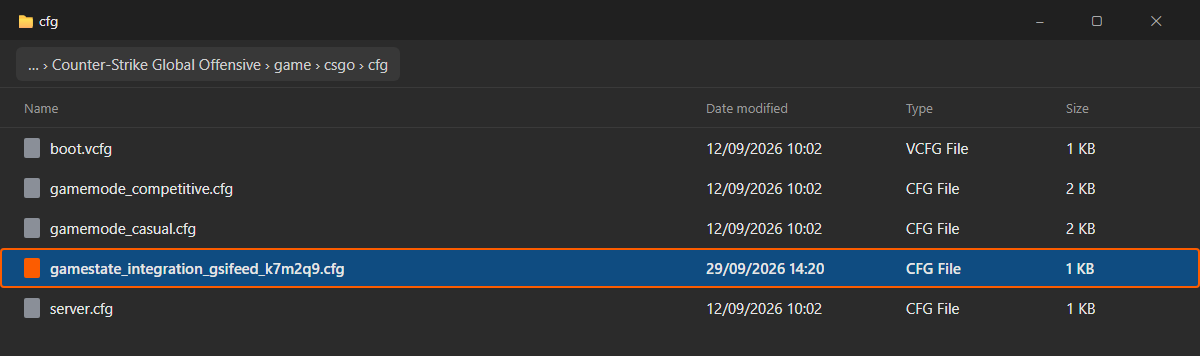
Its name starts with gamestate_integration_gsifeed_, then six characters of its own. Keep the name exactly as it is. The file is made for you and holds a token that is yours alone. This page cannot show it. The bot sends you its link or its text in Steam chat. Pick one way.
Way 1: download it (recommended)
- Write to the bot. It says what it does and asks three yes-or-no questions: may it send charts and infographics, may it send links, and may it read your game. Then type setup. It sends your own link and three steps.
- Open the link. Your browser saves the file. If it asks, choose Keep.
- Go on to step 3.
Way 2: the link alone
- Type setup link to the bot. It sends your own download address. If you said no to links, use way 3.
- Open the link. The browser saves the file under its right name.
- Go on to step 3.
Way 3: copy the text
- Type setup text to the bot. It sends your file's contents.
- In the game's cfg folder (step 3), make a new text file. Name it exactly as the bot's text says: it starts with gamestate_integration_gsifeed_ and ends in .cfg.
- Windows hides file endings by default. If your file's name does not show .cfg at the end, turn on File name extensions in the folder's View menu. Make sure it ends in .cfg, not .txt.
- Paste the text into the file. Save.
-
Put it in the cfg folder and restart CS2
Move the file into your game's cfg folder. On most PCs it is here:
C:\Program Files (x86)\Steam\steamapps\common\Counter-Strike Global Offensive\game\csgo\cfgNot there? In Steam, right-click Counter-Strike 2, then Manage, then Browse local files. Open game, then csgo, then cfg.
Then close CS2 fully and start it again. Counter-Strike reads the file only when it starts.
Start CS2, and the bot writes to you first.
When your game reaches the main menu for the first time, the bot sends you a message on Steam. If you see it, the file works. The bot then asks a few setup questions. Type skip to skip any of them. After that, it writes to you in the buy phase of every round except the pistol rounds, and after the match.

Steam chat
Try it: play a match and I send one line at each freeze time; status shows what I hear.
The bot's own words
Help with setup
The bot has not written after you started CS2
Check the file is in the cfg folder itself, and that its name ends in .cfg, not .cfg.txt. Then close CS2 fully and start it again. Then write to the bot on Steam. If your game has still not connected after a few minutes, the bot sends these checks one at a time.
Is the bot running?
Type status to the bot on Steam. It tells you what it receives from your game. That shows you at once if the file works.
Where are my charts?
After a match, the bot sends its card. The other charts need your replays analysed. For now, that means FACEIT matches, by the link you paste. Each chart has its own word. Type help charts for the list.
I set up before, with gamestate_integration_cs2igl.cfg
It keeps working. You don't need to change it. If you ever download a new file, delete the old gamestate_integration_cs2igl.cfg from the cfg folder. The bot tells you if this applies to you.
Two Steam accounts on one PC
Each Steam account gets its own file. Keep both files in the cfg folder.
I play on two PCs
On the second PC, type setup link or setup text to get the file again. Then do step 3. The same file works on both.
How do I undo this?
Delete the file from the cfg folder. That is all it takes on your PC. Then type one of these to the bot on Steam. coach off stops its messages. The bot still receives your game data. revoke stops the bot from using your game data until you set up again. delete removes all your data within a day. revoke and delete each ask you to confirm: type revoke yes or delete yes within two minutes.
Where you already play
Works
In a tournament match, the organiser's rules may not allow outside help during rounds. Type coach off before the match starts.